

 EN
EN  VI
VI  ZH
ZH Main Content
Link to total product: minsoftware.vn/product/
The previous article had instructions on how to use the automatic friend-making software. Today, I will guide you on how to use Max Create 2Fa software to make your account stronger, avoid being scanned and causing your account to die.
If you don't know what 2Fa is, you can refer to this article: Create 2fa facebook security
You can download the tool at the address ( Download ) Unzip and open it, the interface will look like this
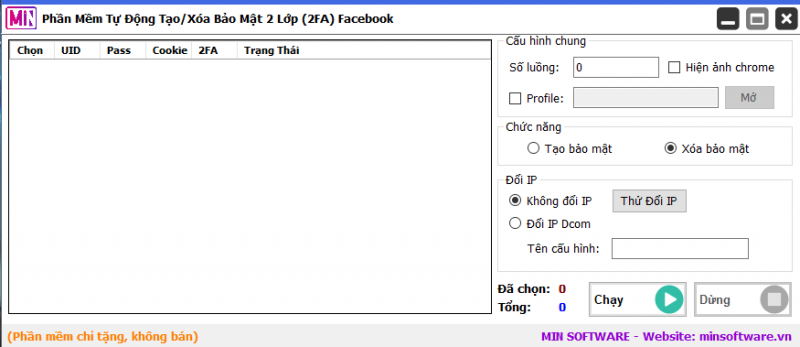
Then you follow these steps:
- Right click on the software and select to import data in your format (uid|password|2fa, uid|password|cookie, ...)
- Select the number of threads you want to run (depending on your computer configuration, I usually choose 6)
- Select profile, the software will automatically create a profile for each separate nick, when finished you can use this profile for account maintenance software
- Select create or delete security mode
Click run and wait for results
Download Max Backup – Software to support unlocking accounts that are checkpointed

MIN Software's software: minsoftware.vn/product/
Software to automatically create facebook nick: Max Register Facebook
VIDEO TUTORIAL
Join the Community Now MIN Software to refer to more useful tools !!!
Fanpage: https://www.facebook.com/minsoftware
Effective Facebook sales software for businesses in the 4.0 era
How to raise Facebook account to make money?
See also: